How to Turn Your Pet Into a Mecha Warrior With AI
 AI Mecha Transformation Team
Pets are the most underrated subject for an AI mecha transformation video. Here is how to keep the fur markings, the muzzle and the ears recognisable while the armour assembles, and why the humanoid failure happens.
How to Turn Your Pet Into a Mecha Warrior With AI
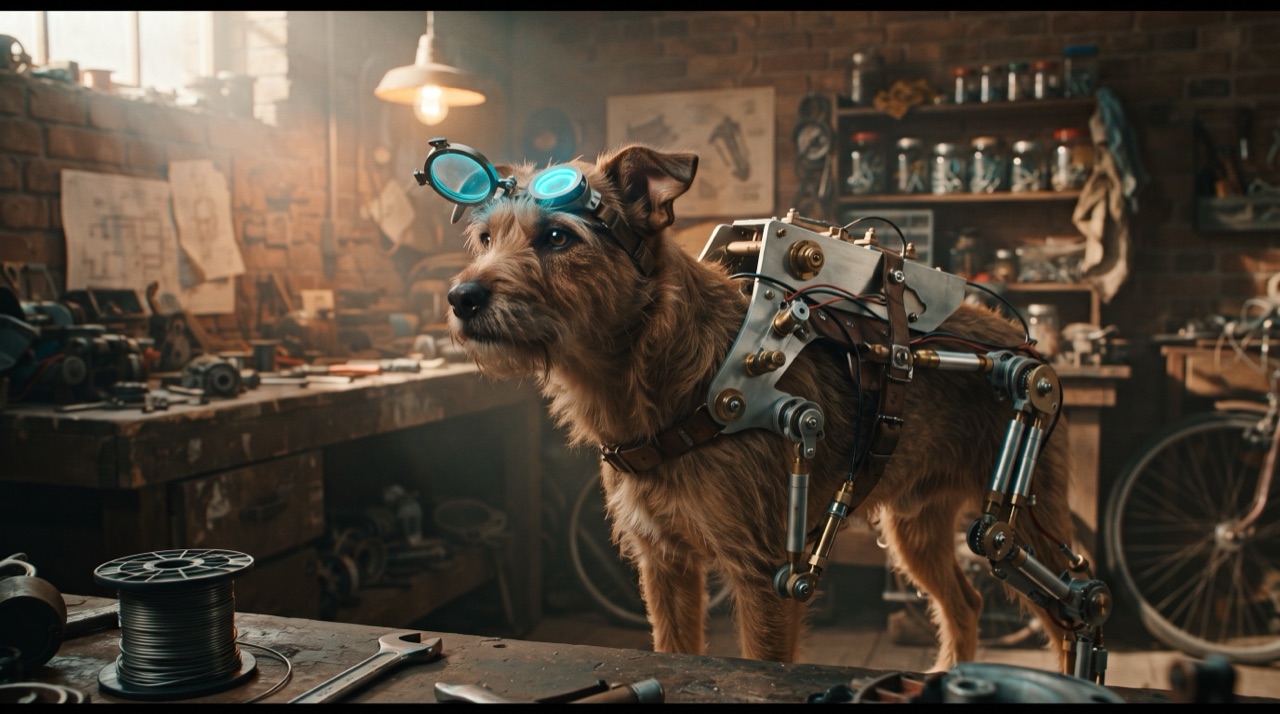
A pet in mechanical armour is the most legible version of this format and the least crowded. Human mecha clips all converge on the same armour silhouette; a dog in a chrome harness with hydraulic pistons on its front legs is instantly its own image, and viewers recognise their own animal in about half a second.
The obstacle is also obvious: the model's prior for armour is humanoid. Left unconstrained, it stands the pet up, gives it shoulders and a chest, and returns a robot with a familiar face on it. This page is how to keep the animal an animal.
The identity clause is doing more work here
For a person, the identity clause protects a face. For a pet, it protects a silhouette — and the silhouette is what a viewer uses to confirm it is their pet. Name the specific features:
- Fur colour and markings. Spots, patches, a white blaze, a brindle pattern. Markings are the fastest recognition cue there is.
- Muzzle shape and snout length. This is what stops the render from becoming a robot head.
- Ear shape and position. Upright, folded, cropped — ears survive a render well and change the whole read.
- Body proportions and leg length. The clause that keeps the animal on four legs, at its own height.
- Tail. A tail is a free animation beat: it lifts at the end of the assembly and the clip feels alive.
One clause covers the rest: "a real animal inside mechanical armour, never a biped, never a humanoid robot."
Prompt, ready to paste
Transform the dog in this photo into a mecha warrior. One continuous shot, vertical 9:16, no cuts: the dog stands in a garage, a chrome harness assembles over its back and shoulders, small hydraulic pistons lock onto the front legs, an angular visor folds down over the brow while the eyes stay visible, and the tail lifts at the end of the assembly. Keep the fur colour, markings, muzzle shape, ear shape and body proportions exactly as photographed — a real dog inside mechanical armour, never a biped, never a humanoid robot. One action only, warm workshop light, no text, no watermark, no duplicated legs.
Category works the same way — swap "dog" for "rabbit", "horse" or whatever is in the photo, and keep every other clause. The prompt library has the fragment table if you want to change the armour treatment.
このクリップ:30クレジット · 月6本で$39.90(Pro)、または年80本で$319
Choose the photo like a casting director
| Photo | Verdict | Why | | ------------------------------------------------------- | ---------------------- | --------------------------------------------------------------------- | | Full body, side or three-quarter, standing, plain floor | Ideal | The whole animal is in frame, so every part has somewhere to attach | | Face close-up, whole head | Good for a helmet beat | The body is missing, so armour has to be invented | | Lying down, curled up, or on a lap | Poor | There is no standing geometry; the model guesses and duplicates | | Two or more animals in frame | Fails | Anchoring splits between subjects | | Action shot, motion blurred | Poor | The model cannot resolve fur edges, so markings drift | | Dark room, phone flash | Poor | Flat sharp light loses the texture that makes the animal recognisable |
The best pet photo for this is unglamorous: a standing animal, evenly lit, on a plain background, with nothing in front of its legs.
Step by step
- Pick the standing photo. Three-quarter view, whole body, plain floor.
- Crop nothing. Upload the frame as shot; cropping the body weakens the standing geometry.
- Select a preset, or paste the pet prompt above. Presets fill the prompt box with a full spec — adjust one clause if you want a different treatment.
- Render 480p first. 5 credits for twelve seconds. Check the leg count and the markings.
- Fix one failure at a time. Legs duplicated? Move the shot closer. Markings drifting? Reduce the amount of body movement you asked for.
- Render at 720p or 1080p. 10 credits for the standard 720p clip, 30 for the 1080p default.
- Download and post. Clean 9:16 MP4, no watermark, private to your account.
What actually goes wrong
- The pet stands up. The strongest humanoid prior in the format. Fix: repeat "never a biped, never a humanoid robot" and keep the height explicit — "at its own natural height, standing on four legs".
- Six legs. Duplicate geometry from a pose the photo did not show, or from a shot where the legs overlap. Fix: shoot from the side, where all four legs are visible separately.
- The markings vanish after the harness arrives. Anchoring weakened because the armour now covers most of the body. Fix: keep the harness on the back and shoulders, leave the legs and face clear.
- The visor eats the eyes. Eyes are the second recognition cue after markings. Fix: "the visor folds down over the brow while the eyes stay visible".
- The pet grows a human chest. Direct consequence of the model treating armour as a humanoid object. Fix: describe the harness as a frame — "a chrome frame that follows the spine and shoulders", not a breastplate.
More of these, written for people but applicable to any subject, are in the troubleshooting guide.
Pets versus people versus vehicles
| Subject | Identity anchors | Best framing | Characteristic failure | | ------- | --------------------------------------- | ------------------------------- | ---------------------------------- | | Person | Face, hair, skin tone, build | Full torso, front-facing | Face drift, generic chest plate | | Pet | Fur markings, muzzle, ears, proportions | Standing, side or three-quarter | Standing upright, extra legs | | Car | Paint colour, body shape, wheel design | Three-quarter front | Wheels disappearing or duplicating | | Bike | Frame colour, tank shape, wheel style | Side-on with rider | Losing the rider entirely |
Each subject needs its own clause set, and each has one failure that dominates its category. Knowing which one you are fighting is most of the work.
Credits, fairly
| Render | Length | Credits | | ------------- | ------ | ------- | | 480p test | 12s | 5 | | 720p standard | 12s | 10 | | 1080p default | 12s | 30 |
A Google sign-in grants 30 credits once — six 480p tests, which is normally enough to land a clean pet render. Email sign-up builds the balance from daily check-ins instead: 10, 20, 30, then 10 for each of the next four days, one per 24 hours. Failed renders refund in full. Everything is listed on pricing.
FAQ
Do smaller pets work as well as dogs? Yes, with one caveat: small animals curl up, dogs stand. If your only photo has the animal lying down, expect fabricated leg geometry. A standing or walking shot resolves it. The pipeline itself treats every pet photo the same way.
Can I put armour on a fish, a bird or a hamster? The format is a mechanical armour assembly, which needs limbs and a body frame. Small mammals and birds work with a harness description; anything without limbs usually reads better as a vehicle-style build-out.
Should the pet hold a weapon? Keep it simple. A single held object is one more action competing for the same frames, and pets carrying weapons is where renders start inventing extra paws.
Will the result look like my pet or like a generic animal? That is entirely the photo and the identity clause. Clear markings plus an explicit markings clause gives you your animal; a soft, backlit photo gives you a generic one.
How long does the render take? The clip is twelve seconds long; rendering a standard clip takes a couple of minutes on the remote renderer, longer at 1080p. The studio shows the real job state rather than a fake progress bar.
Is the output watermarked? No — not on free credits, not on paid ones.
The four presets on the front page work with any pet photo — the clauses above are the parts you edit.